DELEGATES IN UNREAL ENGINE

Delegates are user defined datatypes that can be bound to C++ function(s) (or blueprint event(s)) of an object in a generic way. This means that the object need not be even declared for a particular delegate. Let me demostrate.

In Unreal Engine, a delegate is declared like so:

DECLARE_DYNAMIC_DELEGATE_TwoParams(FAnEvent, float, TimeCoordinate, float, SpaceCoordinate);

This just tells the Engine that we are declaring a user defined datatype (a delegate) which can be bound to a C++ routine with two parameters of type float. Now this delegate can be bound to any member function (with signature void (float, float)) of any object.

For demonstration purposes, consider the following code (TP_PickupComponent.h)

DECLARE_DYNAMIC_MULTICAST_DELEGATE_OneParam(FOnPickUp, ABPToCodeDemoCharacter*, PickUpCharacter);

Furthermore, we note the blueprint usage property of the delegate (see)

UPROPERTY(BlueprintAssignable, Category = "Interaction")
FOnPickUp OnPickUp;

Finally, we observe the application of the delegate here, like so

void UTP_PickUpComponent::OnSphereBeginOverlap(UPrimitiveComponent* OverlappedComponent, AActor* OtherActor, UPrimitiveComponent* OtherComp, int32 OtherBodyIndex, bool bFromSweep, const FHitResult& SweepResult)
{
	// Checking if it is a First Person Character overlapping
	ABPToCodeDemoCharacter* Character = Cast<ABPToCodeDemoCharacter>(OtherActor);
	if(Character != nullptr)
	{
		// Notify that the actor is being picked up
		OnPickUp.Broadcast(Character);

		// Unregister from the Overlap Event so it is no longer triggered
		OnComponentBeginOverlap.RemoveAll(this);
	}
}

This basically translates to the meaning that when the overlap detector of the pickup detects, well, an overlap with player’s character (no pun intended), then notify all the registered events (bound to OnPickUp variable of type delegate defined above) and run the appropriate logic in their respective classes.

The blueprint equivalent of registering event by binding to OnPickUp delegate (.AddDynamic()) is like so (Bind Event On Pick Up node)

The blueprint equivalent of

OnPickUp.Broadcast(Character);

is Call On Pick Up node

A nice property of the delegates is that they can be used in appropriate arbitrary classes (mentioned above). Look at the call to Binding Delegates node, which is a function of class ABPToCodeDemoCharacter (which is not declared or defined where the delegate is declared). The function is defined like so

We can see that an event AnEvent is bound to OnPickUp in the class even though OnPickUp is not declared/defined in the class. The event is like so

Checkout the commit Delegate demonstration (literally :D) to see the logic in action.

A fun fact I saw while working in Sunovatech Pvt. Ltd is that delegate can be passed as a C++ function parameter https://forums.unrealengine.com/t/delegates-as-parameter/299175/13.

Behavior Trees in Game Artificial Intelligence

Due to circumstances beyond my present control, my career trajectory has taken a sharp turn (quantified by delta function ). I hope Dirac would be proud of that! In order to work with same passion and rigor, I have channelized my energy into Artificial Intelligence (AI) and parted ways from Physics. Of course it was painful and depressing, but I found that even such feelings have utility in the catharsis. This blog-post is an attempt to show just that!

The gaming industry has played pivotal role in reshaping the modern networking architecture and graphics rendering (replication, realistic rendering and ray tracing). Therefore it is not unreal to expect the industry to push forward the AI realm. This can be estimated from sheer number of players in games like Fortnite (250 million), Halo and  GTA V among others. Any breakthrough in the field of AI can be conveniently and collectively scrutinized by millions of players, facilitated by streamline workflow including developers, players and academics.

Behavior tree (BT) is an important mathematical structure which generates appropriate series of tasks in modular fashion. For instance, a patrolling pawn in some evil fortress. Unreal Engine (UE) is one of the very first game engines to implement BT in very natural way (given the visual scripting structure of UE called Blueprints). I will demonstrate the BT in action using UE project in this blog-post.

The BT can be pictured as

behaviortree

Here black nodes represent the “composites” (from of flow control) and pink nodes represent “tasks”. I have used two categories of composites

  1. Selector: Executed in left-right pattern. It stops traversing the subtrees once successful execution branch is found.
  2. Sequence: Executed in left-right pattern. It doesn’t stop executing subtrees until unsuccessful execution branch is  found.

The entire BT is executed top-down pattern in deterministic way. A next level implementation could involve assigning probabilities with each edge resulting in particular node, but we won’t talk about that here.

If you were to petrol, what would be the list of tasks you’d make to execute. Probably it might include

  1. Spotting enemy
  2. Chasing enemy if spotted
  3. Else perform random patrol in arbitrary directions

Now next step is to further divide the tasks into single elemental entities. For instance spotting enemy task includes checking lineofsight actors and spin towards appropriate actor if found. Thus the hierarchy and placement of composites and task should be as shown in the figure above.

Now BT in action corresponding to the chase is shown below.

Chase

One can clearly visualize the train of executing branches of the tree. Since Chase Player is a sequence node, we can deduce that the tasks “Rotate to face BB entry”  and “BTT_ChasePlayer” have been executed and now “Move To” task is undergoing and indeed that is what is being done in the Editor.

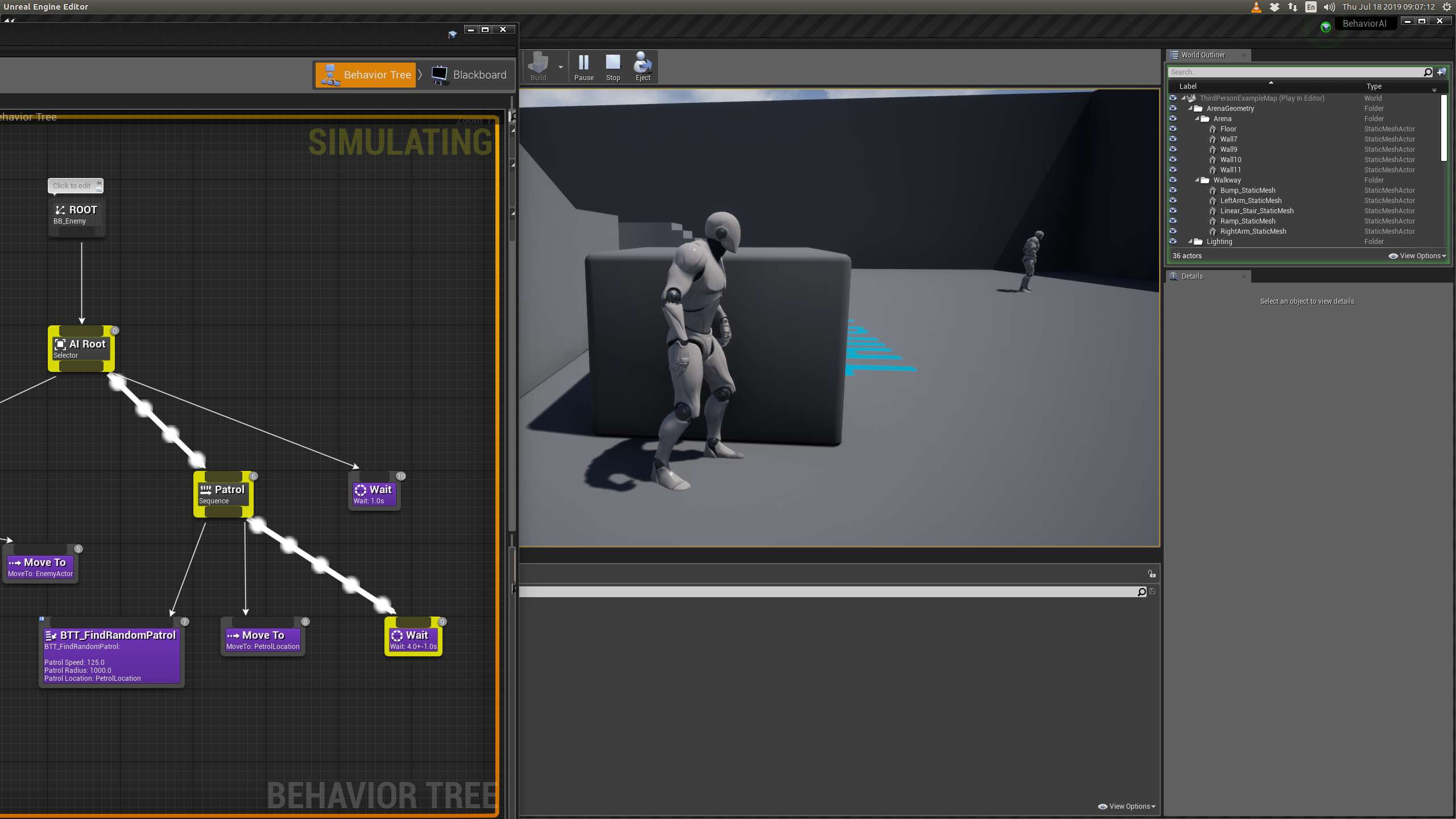
Next, the BT simulation of patrolling with that task “Move To” is

petrol_moveto

and “Wait” is

petrol_wait

The complete information to setup the project is detailed at https://docs.unrealengine.com/en-US/Engine/ArtificialIntelligence/BehaviorTrees/BehaviorTreeQuickStart/index.html. I encourage to try!

Finally I will give a teaser to upcoming UE project https://github.com/ravimohan1991/MAI